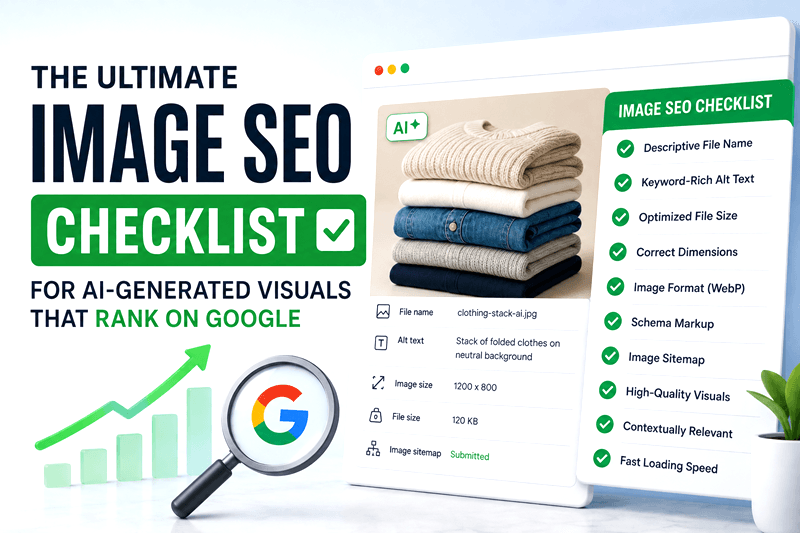
AI-generated visuals are transforming digital marketing, e-commerce, blogging, and social media content. Businesses can now create stunning graphics, product mockups, blog banners, and promotional images within minutes. However, many creators overlook one critical factor: image SEO.
Without proper optimization, even the best AI-generated images may never appear in Google Image Search or contribute to organic traffic growth.
If you want your visuals to rank higher, improve page performance, and attract more clicks, this image SEO checklist will help you optimize every AI-generated image the right way.
Why Image SEO Matters for AI-Generated Visuals
Google increasingly values visual search experiences. Optimized images can drive traffic from:
Google Images
Visual search platforms
Discover feeds
E-commerce search results
AI-powered search engines
Well-optimized AI visuals also improve:
Website engagement
Core Web Vitals
Accessibility
Search rankings
Conversion rates
For brands using AI image tools daily, image SEO is no longer optional.
Complete Image SEO Checklist for AI-Generated Visuals
1. Use Descriptive File Names
One of the biggest mistakes creators make is uploading images with random names like:
IMG_9384.png
Instead, rename files using relevant keywords.
Good Example:
ai-generated-marketing-dashboard.jpg
Bad Example:
final-v2-new.png
Search engines use file names to understand image context. A keyword-rich file name increases the chances of ranking in Google Image Search.
Best Practices
Use lowercase letters
Separate words with hyphens
Keep names short but descriptive
Include the primary keyword naturally
2. Write SEO-Friendly Alt Text
Alt text helps search engines and screen readers understand your image content.
For AI-generated visuals, generic alt text like “AI image” is not enough.
Better Alt Text Example
“AI-generated ecommerce product banner with modern minimalist design”
Tips for Optimized Alt Text
Describe the image clearly
Include target keywords naturally
Avoid keyword stuffing
Keep it under 125 characters
Strong alt text improves accessibility and image search visibility simultaneously.
3. Compress Images Without Losing Quality
Large image files slow down websites and hurt SEO rankings.
Google prioritizes fast-loading pages, especially on mobile devices.
Recommended Formats
WebP for modern websites
JPEG for photographs
PNG for transparent graphics
SVG for icons and vectors
Compression Tools
You can reduce file size using:
TinyPNG
Squoosh
ImageOptim
Optimized AI-generated visuals should balance quality and performance.
4. Use Proper Image Dimensions
Uploading oversized visuals is a common SEO issue.
If your blog content area displays images at 1200px width, avoid uploading 5000px images unnecessarily.
Recommended Practices
Match image size to website layout
Use responsive image scaling
Maintain consistent aspect ratios
Optimize for mobile viewing
Proper dimensions improve page speed and user experience.
5. Add Structured Data for Images
Structured data helps Google better understand visual content.
For product images, blog graphics, or tutorials, schema markup can increase visibility in rich search results.
Useful Schema Types
ImageObject
Product
Article
FAQ
Structured data can improve click-through rates and search appearance.
6. Optimize Captions and Surrounding Text
Google analyzes nearby content to understand images.
Adding relevant captions and contextual paragraphs strengthens SEO signals.
Example
If your image shows an AI-generated social media banner, the surrounding content should mention:
AI design tools
Social media graphics
Visual content marketing
Branding templates
This helps search engines connect your image with relevant search queries.
7. Use Lazy Loading Correctly
Lazy loading improves website speed by loading images only when needed.
However, poor implementation can prevent search engines from indexing visuals properly.
Best Practices
Use native lazy loading
Ensure images remain crawlable
Test image indexing in Google Search Console
Faster websites usually achieve better rankings and lower bounce rates.
8. Create Original AI Visuals
Google values unique content, including images.
Many websites now use generic AI graphics that look identical. Original visuals stand out more in search results and improve engagement.
Ways to Make AI Images Unique
Add custom branding
Use original prompts
Include real screenshots
Combine AI visuals with human editing
Maintain a consistent visual identity
Unique visuals can increase shares, backlinks, and user trust.
9. Optimize Images for Mobile SEO
Most image searches now happen on mobile devices.
Your AI-generated visuals should:
Load quickly
Scale properly
Remain readable on smaller screens
Avoid excessive text overlays
Mobile-friendly visuals improve both SEO performance and user engagement.
10. Use Image Sitemaps
Image sitemaps help Google discover visuals faster.
This is especially important for:
E-commerce websites
Portfolio galleries
AI-generated design libraries
Blog-heavy websites
An updated image sitemap improves indexing efficiency and visibility.
Common Image SEO Mistakes to Avoid
Even experienced marketers make these mistakes with AI-generated visuals:
Uploading uncompressed files
Missing alt text
Using duplicate visuals
Ignoring mobile optimization
Overstuffing keywords
Using irrelevant file names
Forgetting structured data
Avoiding these issues can significantly improve organic traffic potential.
Final Thoughts
AI-generated visuals can dramatically improve content creation speed, branding, and engagement. But without proper optimization, they may never reach their full SEO potential.
Following this image SEO checklist helps your visuals:
Rank higher in Google Images
Improve page speed
Increase organic traffic
Boost click-through rates
Enhance user experience
As visual search continues growing in 2026, businesses that optimize AI-generated images correctly will gain a major competitive advantage.
Ready to Create SEO-Optimized AI Visuals?
Start generating high-quality, search-friendly visuals with Genimager and turn your images into powerful traffic-driving assets for your brand.