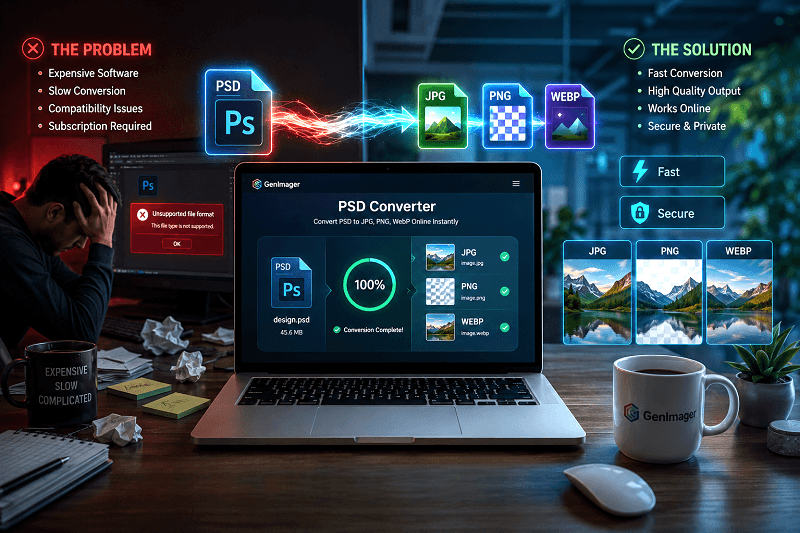
Opening Photoshop files without having Adobe Photoshop installed is still a common challenge in 2026. Many users, particularly marketers, developers, and e-commerce sellers, struggle to access or convert PSD files efficiently.
The problem becomes more frustrating when tools are slow, expensive, or require installation. Not everyone wants to pay for premium software just to convert a file, and compatibility issues often delay workflows.
This is where modern online tools make a difference. Genimager PSD Converter is one of the top PSD converter tools online in 2026, enabling users to convert Photoshop files instantly.
In this blog, we will discover how PSD converters work, why Genimager stands out, and how you can convert PSD files quickly without using Photoshop.
What Is a PSD Converter?
A PSD (Photoshop Document) file is the native format used by Adobe Photoshop. It is widely used by designers because:
It stores layer-based designs
Supports advanced editing (text, shapes, effects)
Maintains high-quality visuals
However, PSD files are not universally supported across platforms, which makes sharing difficult.
Why You Need a PSD Converter
Not everyone uses Photoshop, and that’s where PSD converters become essential.
Key reasons:
Convert PSD to JPG, PNG, or WebP for easy sharing
Access files without installing heavy software
Use designs across marketing, ecommerce, and web projects
What Makes Genimager PSD Converter the Best in 2026?
Genimager focuses on speed, accessibility, and quality, three key factors users expect from modern tools.
1. Lightning-Fast Conversion
Converts files within seconds
No waiting queues or delays
Optimized for high-performance processing
2. Works Globally (Browser-Based)
Accessible from any country
No regional restrictions
Works on Chrome, Safari, Edge, and mobile browsers
3. Secure File Processing
Files are processed securely
No permanent storage
Privacy-focused architecture
4. Multiple Format Support
Convert PSD into widely used formats like JPG, PNG, WebP
Maintain visual quality and structure
Suitable for web, social media, and design workflows
How to Convert PSD Files Online (Step-by-Step)
Upload your PSD file
Choose output format (JPG, PNG, WebP)
Click convert
Download instantly
Best Use Cases for Genimager PSD Converter
Genimager is designed for multiple professional and everyday use cases.
1. Designers Exporting Assets
Designers can quickly convert PSD layers into usable formats for clients or presentations.
2. Marketers Creating Ads
Convert PSD designs into marketing visuals for ads, banners, and campaigns.
3. E-commerce Product Image Conversion
If you need to convert PSD for e-commerce, Genimager helps you generate product-ready images instantly.
4. Developers Needing Quick Assets
Developers can extract UI elements or convert design files for web development workflows.
Best Formats to Convert PSD Into
Choosing the right format depends on your use case.
1. PSD to JPG For Sharing
Lightweight format
Ideal for social media and email
Faster loading
2. PSD to PNG For Transparency
Supports transparent backgrounds
Best for logos and overlays
High-quality visuals
3. PSD to WebP for Web Optimization
Smaller file sizes
Faster website performance
Ideal for modern web design
Conclusion
PSD files are powerful but not always convenient to use outside Photoshop. Whether you're a designer, marketer, developer, or e-commerce seller, having a reliable PSD converter is essential.
Genimager offers a simple and efficient solution by combining speed, quality, and accessibility. With no installation required and support for multiple formats, it helps users convert files instantly from anywhere in the world.
If you’re looking for a fast, secure, and easy-to-use PSD converter in 2026, Genimager is a strong choice.
Try Genimager PSD Converter Now and Convert Your Files Instantly.
FAQs
Q1. How do I convert PSD to JPG without Photoshop?
Use an online tool like Genimager PSD Converter. Upload your PSD file, select JPG, and download it instantly. It works directly in your browser without requiring any software installation.
Q2. Is Genimager PSD Converter free?
Yes, Genimager PSD Converter is completely free to use. You don’t need to install anything, making it convenient for quick file conversions.
Q3. Can I convert PSD files online safely?
Yes, Genimager ensures secure file processing. Files are handled safely and are not stored permanently, ensuring user privacy.
Q4. Which format is best for PSD conversion?
JPG is best for sharing; PNG is ideal for transparency, and WebP is suitable for web optimization due to smaller file sizes and faster loading speeds.
Q5. Can I use the PSD converter on my mobile?
Yes, Genimager works on all devices, including smartphones and tablets. You can convert PSD files directly using your mobile browser without any limitations.