Aspect Ratio Converter for Social Media: Resize Images Perfectly with Genimager
Creating the perfect visual for social media is no longer optional; it directly impacts clicks, engagement, and conversions. One of the most overlooked factors is the image aspect ratio. If your visuals are cropped incorrectly or appear stretched, users will scroll past them instantly. This is where an Aspect ratio converter for social media becomes essential. With Genimager, you can resize images accurately for every platform without losing quality or wasting time.
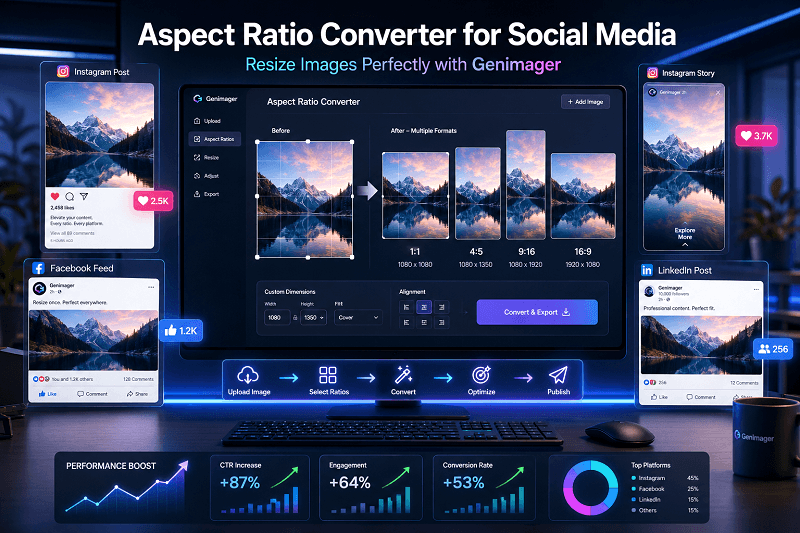
Creating the perfect visual for social media is no longer optional; it directly impacts clicks, engagement, and conversions. One of the most overlooked factors is the image aspect ratio. If your visuals are cropped incorrectly or appear stretched, users will scroll past them instantly.
This is where an Aspect ratio converter for social media becomes essential. With Genimager, you can resize images accurately for every platform without losing quality or wasting time.
In this guide, you’ll learn how aspect ratios influence performance, how to optimize visuals for each platform, and how Genimager helps you improve CTR and conversions in 2026.
What Is an Aspect Ratio Converter?
An aspect ratio converter is a tool that resizes images to fit the specific dimensions required by platforms such as Instagram, Facebook, LinkedIn, and TikTok.
Why Aspect Ratio Matters
Prevents unwanted cropping
Maintains visual clarity
Improves feed appearance
Enhances user engagement
Even a high-quality image can perform poorly if the ratio is incorrect.
Why Social Media Platforms Require Different Aspect Ratios
Each platform is designed differently, which means image sizes vary.
Common Aspect Ratios by Platform
Instagram posts: 1:1 or 4:5
Instagram Stories/Reels: 9:16
Facebook posts: 1:1 or 16:9
LinkedIn posts: 1.91:1
Pinterest pins: 2:3
Using the wrong size can reduce visibility and impact reach.
How Incorrect Image Sizes Reduce CTR and Conversions
If your visuals are not optimized, you may face:
Cropped headlines or text
Blurry or stretched images
Lower engagement rates
Reduced trust and professionalism
Impact on User Behavior
Users decide within seconds whether to engage. A poorly sized image can lead to:
Lower click-through rates
Fewer shares
Missed conversions
Benefits of Using Genimager Aspect Ratio Converter
Genimager is designed for marketers, creators, and businesses who want fast and accurate image resizing.
Key Features
One-click resizing for all platforms
High-quality output without distortion
Predefined social media dimensions
Easy-to-use interface
Why Choose Genimager
Unlike manual resizing tools, Genimager ensures:
Consistent branding
Time-saving workflows
Better performance across channels
Step-by-Step Guide to Resize Images with Genimager
Step 1: Upload Your Image
Start by uploading your original image into Genimager.
Step 2: Select Aspect Ratio
Genimager adjusts the dimensions.
Step 3: Download Optimized Image
Export your image in high quality, ready for publishing.
Best Practices for Image Optimization in 2026
1. Keep Text Within Safe Zones
Avoid placing important text near edges.
2. Use High-Resolution Images
Low-quality images reduce credibility.
3. Maintain Consistent Branding
Use similar colors, fonts, and layouts.
4. Test Different Formats
Experiment with square, vertical, and horizontal formats.
Use Cases for Aspect Ratio Converter
1. For Businesses
Product promotions
Ads and campaigns
Brand awareness posts
2. For Content Creators
Instagram reels
YouTube thumbnails
Pinterest graphics
3. For Marketers
Landing page visuals
Email marketing images
Paid ad creatives
Common Mistakes to Avoid
Uploading low-resolution images
Ignoring platform-specific sizes
Overcrowding visuals with text
Not previewing before posting
Conclusion
In 2026, visual content plays a major role in driving traffic and conversions. Using the correct aspect ratio is no longer optional; it’s a requirement for success.
An Aspect Ratio Converter for social media like Genimager simplifies the process, ensuring your images look professional across all platforms. By optimizing your visuals, you can improve engagement, increase CTR, and achieve better results from your content strategy.
Ready to create perfectly sized images for every platform?
Start using Genimager today and transform your visuals into high-performing content that drives clicks, engagement, and conversions instantly.
FAQs
1. What is the best aspect ratio for Instagram posts?
The best aspect ratios are 1:1 (square) and 4:5 (vertical) for better engagement.
2. Why do aspect ratios matter for social media?
They ensure images display correctly without cropping or distortion.
3. Can I resize images without losing quality?
Yes, tools like Genimager maintain image quality during resizing.
4. Which aspect ratio works best for ads?
It depends on the platform, but 1:1 and 9:16 often perform well.
5. How does image size affect engagement?
Properly sized images improve visibility, clicks, and user interaction.